How to Create Your Meta Business Portfolio the Right Way
Your Meta Business Portfolio is the foundation for WABA, ads, and the blue tick. Follow the right setup steps, plus tips to avoid account limits from day one.

Before you can run WhatsApp Business API (WABA), Meta ads, or apply for the blue tick, you need one thing: a Meta Business Portfolio, the tool Meta used to call Facebook Business Manager (FBM) and renamed in 2024. It's the free control center that holds your business assets and identity in one place, and you create it directly inside Meta Business Suite, no Facebook Page required first.
Quick naming note: Meta Business Suite is the dashboard you log into daily, inbox, posts, insights, while the portfolio sits underneath it, holding ownership, access, and assets. You create the portfolio once and live in the Suite every day.
Your personal Facebook account is only an SSO login layer, colleagues and API clients never see your personal profile data.
What you need first
- A personal Facebook account (used only to verify your identity at login).
- A business email address, ideally one on your own domain, like you@yourbrand.com.
- Basic business details: legal name, address, phone, and website.
Step 1: Create your business portfolio in Meta Business Suite
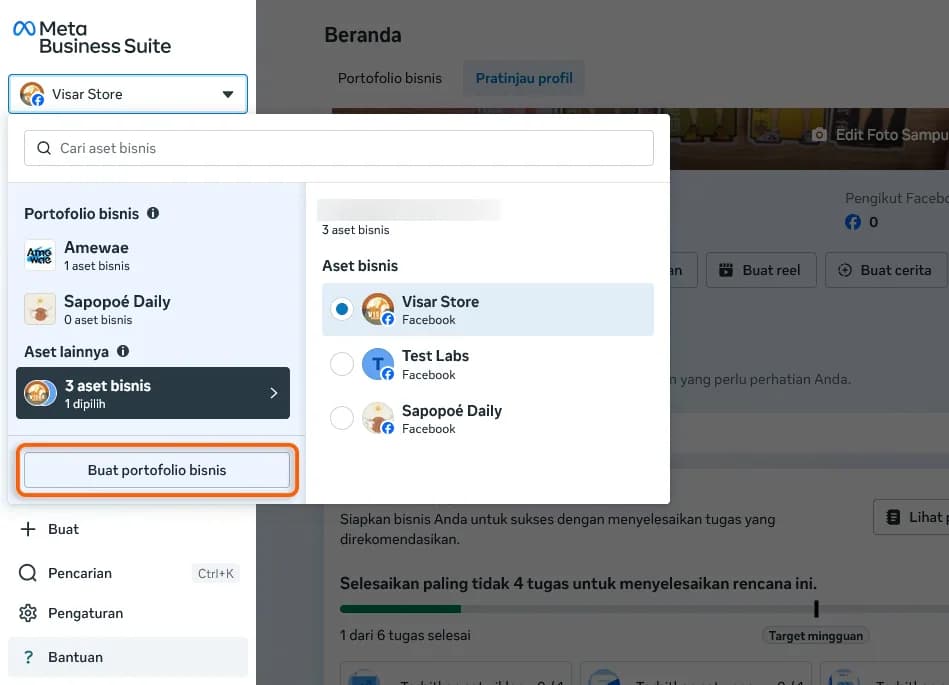
Head to business.facebook.com and log in with your personal Facebook account. There's no hidden button to hunt for, the option lives right in the account switcher at the top left.
- Click the account dropdown at the top left, just below Home.
- Choose "Create a business portfolio" (Buat portofolio bisnis).
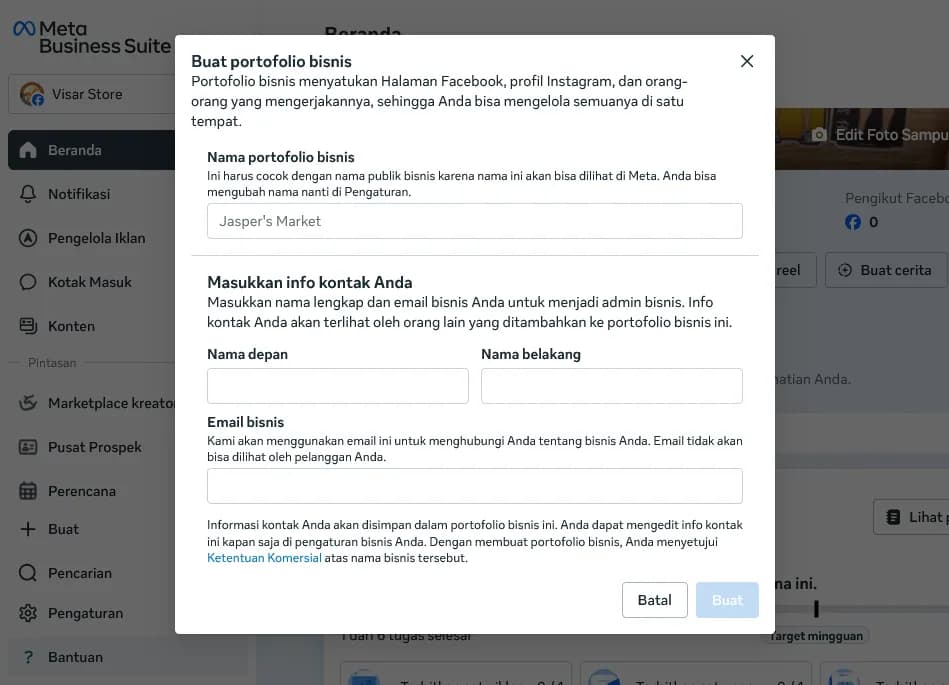
- Enter your business portfolio name, match your public brand name, and skip special characters.
- Add your first name, last name, and a business email, Meta sends a confirmation link there.
- Click Create. Your portfolio is live straight away.
Step 2: Link your business assets
With the portfolio created, link the assets you'll manage. A Facebook Page is optional, add it only if you need a public identity or plan to run ads.
- Add a Page: Settings › Accounts › Pages › Add (optional).
- Connect Instagram: Settings › Accounts › Instagram accounts.
- Add your team: Settings › Users › People, invite staff and set their permissions.
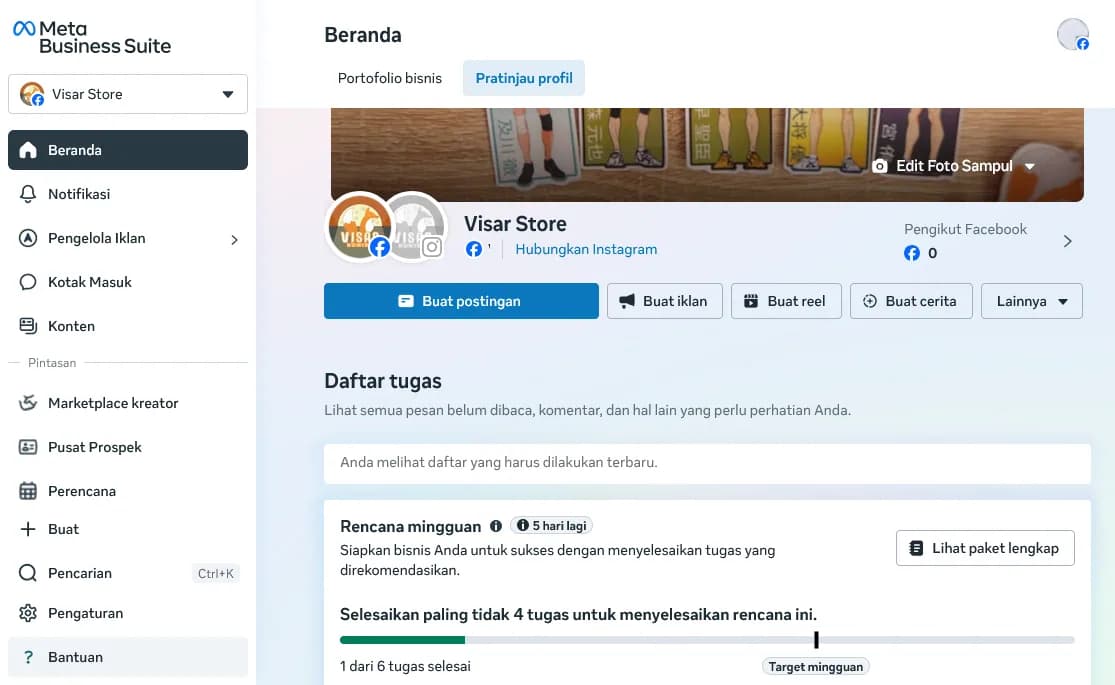
Step 3: Configure Business Settings and lock it down
Open Settings and complete your company info: your business registration number, that's your NIB, NPWP, or TIN, plus website, phone, and time zone. This is also where you manage who gets in.
Meta splits access into three types, so give each person only what they need:
- People, your own staff and freelancers, added by email.
- Partners, an agency or external business that manages assets on your behalf.
- System users, non-human accounts your apps and APIs use (this is what WABA connects through).
Set up at least two human admins so you're never locked out, and turn on 2FA, Meta requires it before business verification. For API integrations you'll use a System User: a non-human account that generates the persistent access token your server needs to talk to Meta.
Common mistakes to avoid
- Creating the portfolio on a coworker's personal profile who might leave, always keep two admins.
- Using a business name that doesn't match your documents, it stalls verification later.
- Skipping two-factor authentication, then getting stuck before verification.
- Using a free email (Gmail, Yahoo) when you have a domain, a domain email makes verification smoother.
- Business Manager and "Meta Business Portfolio" are the same thing, Meta renamed it in 2024.
- Create the portfolio straight from the account dropdown in Meta Business Suite, no Page needed first; link it later.
- Add two admins and turn on 2FA before anything else, it protects you and is required before business verification.
Next step: verify your business, then connect WhatsApp
Your portfolio is the foundation, not the finish line. To go live on WhatsApp Business API through Zenziva, your business has to be verified by Meta first, and the documents you'll need depend on your business type. We walk through the whole verification flow, screen by screen, in the next guide.
Official WhatsApp Business API.
Trusted infrastructure for industrial-scale communication, with eligibility for the official Blue Tick from Meta.
Register WABA Now →